lunes, 24 de septiembre de 2012

Como encriptar y desencriptar passwords y almacenarlo en Base de Datos con ASP.NET

Aqui explicare como encriptar data y guardarla en la base de datos y como desencriptar esta data encriptada en la base de datos usando ASP.NET.
En este ejemplo tengo un webform con 4 campos username, password, firstname y lastname lo que hare sera encriptar el password y guardarlo en la base de datos luego voy a jalar este campo y desencriptar este campo y mostrarlo usando un gridview.
El diseño se vera asi:
El codigo en el lado del cliente sera este:
</head>
<body>
<form id="form1" runat="server">
<div>
<table align="center">
<tr>
<td colspan="2">
<b>Encryption and Decryption of Password</b>
</td>
</tr>
<tr>
<td>
UserName
</td>
<td>
<asp:TextBox ID="txtname" runat="server"></asp:TextBox>
</td>
</tr>
<tr>
<td>
Password
</td>
<td>
<asp:TextBox ID="txtPassword" runat="server" TextMode="Password"></asp:TextBox>
</td>
</tr>
<tr>
<td>
FirstName
</td>
<td>
<asp:TextBox ID="txtfname" runat="server"></asp:TextBox>
</td>
</tr>
<tr>
<td>
LastName
</td>
<td>
<asp:TextBox ID="txtlname" runat="server"></asp:TextBox>
</td>
</tr>
<tr>
<td>
</td>
<td>
<asp:Button ID="btnSubmit" runat="server" Text="Submit"
onclick="btnSubmit_Click" />
</td>
</tr>
</table>
</div>
<div>
<table align="center">
<tr>
<td>
<b>Encryption of Password Details</b>
</td>
</tr>
<tr>
<td>
<asp:GridView ID="gvUsers" runat="server" CellPadding="4" BackColor="White"
BorderColor="#CC9966" BorderStyle="None" BorderWidth="1px">
<RowStyle BackColor="White" ForeColor="#330099" />
<FooterStyle BackColor="#FFFFCC" ForeColor="#330099" />
<PagerStyle BackColor="#FFFFCC" ForeColor="#330099" HorizontalAlign="Center" />
<SelectedRowStyle BackColor="#FFCC66" Font-Bold="True" ForeColor="#663399" />
<HeaderStyle BackColor="#990000" Font-Bold="True" ForeColor="#FFFFCC"
HorizontalAlign="Left"/>
</asp:GridView>
</td>
</tr>
</table>
</div>
<div>
<table align="center">
<tr>
<td>
<b>Decryption of Password Details</b>
</td>
</tr>
<tr>
<td>
<asp:GridView ID="gvdecryption" runat="server" BackColor="White"
BorderColor="#CC9966" BorderStyle="None" BorderWidth="1px" CellPadding="4"
onrowdatabound="gvdecryption_RowDataBound">
<RowStyle BackColor="White" ForeColor="#330099" />
<FooterStyle BackColor="#FFFFCC" ForeColor="#330099" />
<PagerStyle BackColor="#FFFFCC" ForeColor="#330099" HorizontalAlign="Center" />
<SelectedRowStyle BackColor="#FFCC66" Font-Bold="True" ForeColor="#663399" />
<HeaderStyle BackColor="#990000" Font-Bold="True" ForeColor="#FFFFCC" />
</asp:GridView>
</td>
</tr>
</table>
</div>
</form>
Despues de esto en el lado del servidor agregar los namespace
System.Text y System.Data.SQLCliente. En el primero contiene clases que representan codificacion de caracteres ASCII y Unicode y con el segundo nos permitira crear conexiones a la Base de Datos.
Despues de esto diseñamos una BD con el nombre que quieran, crean 1 tabla de nombre Usuario con 4 campos tipo nvarchar username, password, firstname y lastname.
private const string strconnection = "Data Source=XSaint;Initial Catalog=XSaint;Integrated Security=True";
    SqlConnection con = new SqlConnection(strconnection);
    protected void Page_Load(object sender, EventArgs e)
    {
        if (!IsPostBack)
        {
            BindencryptedData();
            BindDecryptedData();
        }
    }

    protected void btnSubmit_Click(object sender, EventArgs e)
    {
        string strpassword = Encryptdata(txtPassword.Text);
        con.Open();
        SqlCommand cmd = new SqlCommand("insert into Usuario(UserName,Password,FirstName,LastName) values('" + txtname.Text + "','" + strpassword + "','" + txtfname.Text + "','" + txtlname.Text + "')", con);
        cmd.ExecuteNonQuery();
        con.Close();
        BindencryptedData();
        BindDecryptedData();
    }
    protected void BindencryptedData()
    {
        con.Open();
        SqlCommand cmd = new SqlCommand("select * from Usuario", con);
        SqlDataAdapter da = new SqlDataAdapter(cmd);
        DataSet ds = new DataSet();
        da.Fill(ds);
        gvUsers.DataSource = ds;
        gvUsers.DataBind();
        con.Close();
    }
    protected void BindDecryptedData()
    {
        con.Open();
        SqlCommand cmd = new SqlCommand("select * from Usuario", con);
        SqlDataAdapter da = new SqlDataAdapter(cmd);
        DataSet ds = new DataSet();
        da.Fill(ds);
        gvdecryption.DataSource = ds;
        gvdecryption.DataBind();
        con.Close();
    }
    private string Encryptdata(string password)
    {
        string strmsg = string.Empty;
        byte[] encode = new byte[password.Length];
        encode = Encoding.UTF8.GetBytes(password);
        strmsg = Convert.ToBase64String(encode);
        return strmsg;
    }
    private string Decryptdata(string encryptpwd)
    {
        string decryptpwd = string.Empty;
        UTF8Encoding encodepwd = new UTF8Encoding();
        Decoder Decode = encodepwd.GetDecoder();
        byte[] todecode_byte = Convert.FromBase64String(encryptpwd);
        int charCount = Decode.GetCharCount(todecode_byte, 0, todecode_byte.Length);
        char[] decoded_char = new char[charCount];
        Decode.GetChars(todecode_byte, 0, todecode_byte.Length, decoded_char, 0);
        decryptpwd = new String(decoded_char);
        return decryptpwd;
    }

    protected void gvdecryption_RowDataBound(object sender, GridViewRowEventArgs e)
    {
        if (e.Row.RowType == DataControlRowType.DataRow)
        {
            string decryptpassword = e.Row.Cells[1].Text;
            e.Row.Cells[1].Text = Decryptdata(decryptpassword);
        }
    }
al ejecutar les saldra como la foto de arriba =)

domingo, 23 de septiembre de 2012

Validacion de Direcciones Postales de USA en ASP.NET

Para este proyecto descargaremos la dll llamada USPSAddressValidator y la agregamos como referencia a nuestro proyecto. Ademas crearemos 2 paginas de nombre AddressValidator y AddressVerification. En el primero lo diseñamos de la siguiente forma:
Ahora el codigo del cliente tendra este codigo(AddressValidator.aspx):
<head runat="server">
    <title>Address Verification For USA</title>
    <script type="text/javascript">


        function YahooWindow() {
            var street = document.getElementById('<%=txtAddress.ClientID %>').value;
            var city = document.getElementById('<%=txtCity1.ClientID %>').value;
            var e = document.getElementById('<%=ddlState.ClientID%>');
            //For ModelWindow then uncomment below code
//            $("#Address1").fancybox({
//                'width': '55%',
//                'height': '30%',
//                'autoScale': false,
//                'transitionIn': 'none',
//                'transitionOut': 'none',
//                'type': 'iframe'
//            });
            var strV = e.options[e.selectedIndex].text;
            //alert(city);
            document.getElementById('Address2').href = 'AddressVerification.aspx?street=' + street + '&city=' + city + '&state=' + strV + ''
            //yahoowin = dhtmlmodal.open('yahoo', 'iframe', 'AddressVerification.aspx?street=' + street + '&city=' + city + '&state=' + strV + '', 'Address Verification', 'width=400px,height=350px,center=1');
            //             $("#Address1").click();
            //             return false;
        }
    </script>
</head>
<body>
    <form id="form1" runat="server">
    <div>
        <table>
            <tr>
                <td class="sub02" width="180px">
                    Address:
                </td>
                <td>
                    <asp:TextBox runat="server" ID="txtAddress" CssClass="input" />
                    <a href="#" id="Address2" onclick="return YahooWindow();">[Verify Address] </a><a
                        href="#" id="Address1"></a>
                
                </td>
            </tr>
            <tr>
                <td class="sub02" width="180px">
                    City:
                </td>
                <td>
                    <asp:TextBox runat="server" ID="txtCity1" CssClass="input" />
                   
                </td>
            </tr>
            <tr>
                <td class="sub02" width="180px">
                    State:
                </td>
                <td>
                    <asp:DropDownList runat="server" ID="ddlState" CssClass="input">
                        <asp:ListItem>--Select State--</asp:ListItem>
                        <asp:ListItem>AK</asp:ListItem>
                        <asp:ListItem>AL</asp:ListItem>
                        <asp:ListItem>AR</asp:ListItem>
                        <asp:ListItem>AZ</asp:ListItem>
                        <asp:ListItem>CA</asp:ListItem>
                        <asp:ListItem>CO</asp:ListItem>
                        <asp:ListItem>CT</asp:ListItem>
                        <asp:ListItem>DC</asp:ListItem>
                        <asp:ListItem>DE</asp:ListItem>
                        <asp:ListItem>FL</asp:ListItem>
                        <asp:ListItem>GA</asp:ListItem>
                        <asp:ListItem>HI</asp:ListItem>
                        <asp:ListItem>IA</asp:ListItem>
                        <asp:ListItem>ID</asp:ListItem>
                        <asp:ListItem>IL</asp:ListItem>
                        <asp:ListItem>IN</asp:ListItem>
                        <asp:ListItem>KS</asp:ListItem>
                        <asp:ListItem>KY</asp:ListItem>
                        <asp:ListItem>LA</asp:ListItem>
                        <asp:ListItem>MA</asp:ListItem>
                        <asp:ListItem>MD</asp:ListItem>
                        <asp:ListItem>ME</asp:ListItem>
                        <asp:ListItem>MI</asp:ListItem>
                        <asp:ListItem>MN</asp:ListItem>
                        <asp:ListItem>MO</asp:ListItem>
                        <asp:ListItem>MS</asp:ListItem>
                        <asp:ListItem>MT</asp:ListItem>
                        <asp:ListItem>NC</asp:ListItem>
                        <asp:ListItem>ND</asp:ListItem>
                        <asp:ListItem>NE</asp:ListItem>
                        <asp:ListItem>NH</asp:ListItem>
                        <asp:ListItem>NJ</asp:ListItem>
                        <asp:ListItem>NM</asp:ListItem>
                        <asp:ListItem>NV</asp:ListItem>
                        <asp:ListItem>NY</asp:ListItem>
                        <asp:ListItem>OH</asp:ListItem>
                        <asp:ListItem>OK</asp:ListItem>
                        <asp:ListItem>OR</asp:ListItem>
                        <asp:ListItem>PA</asp:ListItem>
                        <asp:ListItem>RI</asp:ListItem>
                        <asp:ListItem>SC</asp:ListItem>
                        <asp:ListItem>SD</asp:ListItem>
                        <asp:ListItem>TN</asp:ListItem>
                        <asp:ListItem>TX</asp:ListItem>
                        <asp:ListItem>UT</asp:ListItem>
                        <asp:ListItem>VA</asp:ListItem>
                        <asp:ListItem>VT</asp:ListItem>
                        <asp:ListItem>WA</asp:ListItem>
                        <asp:ListItem>WI</asp:ListItem>
                        <asp:ListItem>WV</asp:ListItem>
                        <asp:ListItem>WY</asp:ListItem>
                    </asp:DropDownList>
                </td>
            </tr>
            <tr>
                <td class="sub02" width="180px">
                    Zip:
                </td>
                <td>
                    <asp:TextBox runat="server" ID="txtZipCode" CssClass="input" />
                </td>
            </tr>
        </table>
    </div>
    </form>
</body>
El diseño de nuestro 2 webform el cual nos mostrara si la direccion es valida sera el siguiente:
El codigo del lado del cliente sera este(Addressverification.aspx)
<head runat="server">
    <title></title>
    <style type="text/css">
    body{ margin:0;
          padding:0;
          font-family:Arial, helventica, Verdana;
          font-size:11px;
    }
    </style>
</head>
<body>
    <form id="form1" runat="server">
    <div  style="text-align: left; vertical-align: middle;">
    
    <asp:Image runat="server" id="imgNo" ImageAlign="AbsMiddle" 
            ImageUrl="~/images/cancel_128x128.png" Height="65px" Width="71px"></asp:Image>
    <asp:Image runat="server" id="imgYes" ImageAlign="AbsMiddle" 
            ImageUrl="~/images/k10760520.jpg" Height="59px" Width="62px"></asp:Image>    
    <asp:Label runat="server" id="lblVerification"></asp:Label>    
    </div>
    <div  style="text-align: left; padding-left:75px;">
    <asp:RadioButton runat="server" id="rdo1" Text="Give me some address suggestions" GroupName="rdosug" AutoPostBack="true"></asp:RadioButton><br /> 
    <asp:RadioButton runat="server" id="rdo2" Text="The address I entered is correct" GroupName="rdosug" AutoPostBack="true"></asp:RadioButton> <br /> 
    <asp:RadioButton runat="server" id="rdo3" Text="I will make my address corrections  " GroupName="rdosug" AutoPostBack="true"></asp:RadioButton>    
    </div>
    </form>
</body>
En el codigo del lado del servidor escriben lo siguiente(AddressVerification.aspx.vb)
Imports System.Web.UI.HtmlControls
Imports System.Configuration
Imports System.Net
Partial Class AddressVerification
    Inherits System.Web.UI.Page
    Private Function ValidateAddress(ByVal street As String, ByVal city As String, ByVal state As String) As String
        If ConfigurationManager.AppSettings("proxy") <> [String].Empty Then
            Dim p As WebProxy = Nothing
            Dim proxyAddressAndPort As String = ConfigurationManager.AppSettings("proxy")
            Dim proxyUserName As String = ConfigurationManager.AppSettings("proxyUserName")
            Dim proxyPassword As String = ConfigurationManager.AppSettings("proxyPassword")
            Dim cred As ICredentials
            cred = New NetworkCredential(proxyUserName, proxyPassword)
            p = New WebProxy(proxyAddressAndPort, True, Nothing, cred)
            GlobalProxySelection.[Select] = p
        End If
        If street = String.Empty Then
            street = "Test"
        End If
        If city = String.Empty Then
            city = "Test"
        End If
        If state = "--Select State--" Then
            state = "TA"
        End If
        Dim res As String = PAB.Utils.USPS.AddressValidator.ValidateAddress(street, city, state)
        Return res
    End Function

    Protected Sub Page_Load(ByVal sender As Object, ByVal e As System.EventArgs) Handles Me.Load
        If Not Request("city") Is Nothing Then
            Dim strvalid As String = String.Empty
            strvalid = Me.ValidateAddress(Request("street"), Request("city"), Request("state"))
            If strvalid = "Invalid Address" Then
                lblVerification.Text = "We’re sorry.  We were unable to verify your address with the United States Postal Service."
                imgYes.Visible = False
            Else
                lblVerification.Text = "Congratulations!  We have successfully verified your shipping address!"
                imgNo.Visible = False
                rdo1.Visible = False
                rdo2.Visible = False
                rdo3.Visible = False

            End If
        End If
    End Sub
End Class
. finalmente en nuestro web.config modificamos nuestra etiqueta appconfig y la escribimos como esta abajo:
<appSettings>
    <add key="proxy" value="10.10.201.3:8080"/>
    <add key="proxyUserName" value=""/>
    <add key="proxyPassword" value=""/>
  </appSettings>
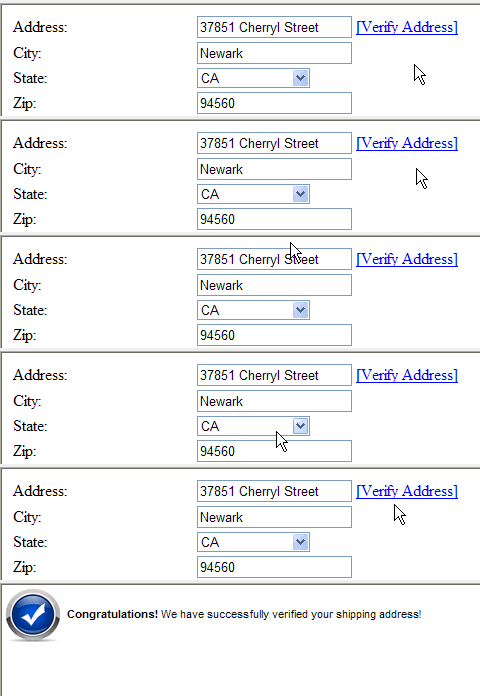
si pusieron todo el codigo como les indique les debe salir asi:
U.S.A Postal Address Validation
Espero les ayude este ejemplo

Uso de Hashtable para Checkboxlist en ASP.NET

Para hacer esto escribimos este codigo en el lado del cliente(Default.aspx):
<form id="form1" runat="server">
<div>

<asp:CheckBoxList ID="CheckBoxList1" runat="server">
</asp:CheckBoxList>
<asp:Button ID="Button1" runat="server" Text="Button" onclick="Button1_Click" />
<br />
<br />
Text: <asp:Label ID="Label1" runat="server" Text="Label"></asp:Label>
<br />    
Value:  <asp:Label ID="Label2" runat="server" Text="Label"></asp:Label>
</div>
</form>
Ahora en el lado del servidor utilizaremos la propiedad IsPostBack en la cual inicializamos nuestro HashTable y lo agregamos a un CheckBox, y en el boton indicaremos que items se dieron check junto con sus IDS.
using System.Collections;
public partial class _Default : System.Web.UI.Page 
{
    protected void Page_Load(object sender, EventArgs e)
    {
        Label1.Text = string.Empty;
        Label2.Text = string.Empty;
        if (!IsPostBack)
        {
            Hashtable hs = new Hashtable();
            hs.Add("1", "sajjad");
            hs.Add("2", "ahmed");
            hs.Add("3", "imtiaz");
            hs.Add("4", "ghazi");
            hs.Add("5", "sohail");
            hs.Add("6", "zahid");
            hs.Add("7", "irfan");
            CheckBoxList1.DataSource = hs;
            CheckBoxList1.DataValueField = "Key";
            CheckBoxList1.DataTextField = "Value";
            CheckBoxList1.DataBind();
        }
    }
    protected void Button1_Click(object sender, EventArgs e)
    {
        Label1.Text = string.Empty;
        Label2.Text = string.Empty;
        foreach (ListItem listitem in CheckBoxList1.Items)
        {
            if (listitem.Selected)
            {
                Label1.Text += listitem.Text + "     ,     ";
                Label2.Text += listitem.Value + "     ,     ";
            }
        }
    }
}

sábado, 22 de septiembre de 2012

Generar passwords aleatorios en ASP.NET

En este ejemplo generaremos una clave aleatoria ingresando la longitud de la misma en el textbox y dando click en el boton se mostrara en el label:
En el lado del cliente agregamos este codigo(Default.aspx)
<form id=”form1″ runat=”server”>
<div>
<asp:TextBox ID=”TextBox1″ runat=”server”></asp:TextBox>
<asp:Button ID=”rndpwd” runat=”server” Text=”Generate Pwd” onclick=”rndpwd_Click” />
<br />
<asp:Label ID=”Label1″ runat=”server” Text=”Label”></asp:Label>
</div>
</form>
Ahora creamos una clase en el app_code y escribimos este metodo ahi:
public static string GetRandomPassword(int length)
    {
        char[] chars = "$%#@!*abcdefghijklmnopqrstuvwxyz1234567890?;:ABCDEFGHIJKLMNOPQRSTUVWXYZ^&".ToCharArray();
        string password = string.Empty;
        Random random = new Random();

        for (int i = 0; i < length; i++)
        {
            int x = random.Next(1,chars.Length);
            //Don't Allow Repetation of Characters
            if (!password.Contains(chars.GetValue(x).ToString()))
                password += chars.GetValue(x);
            else
                i--;
        }
        return password;
    }
Llamamos esta pagina en el lado del servidor utilizando el evento click del boton de la siguiente manera:
protected void rndpwd_Click(object sender, EventArgs e)
    {
        Label1.Text = PasswordGeneration.GetRandomPassword(Convert.ToInt32(TextBox1.Text));
    }
y listo ejecuten el codigo ingresan un numero y les saldra un password de esa longitud

Validar direcciones email usando JQuery en ASP.NET

Veremos aqui una funcionalidad basica para validar direcciones email. En este post, te mostrare como validar direcciones email usando JQuery. Para validar direcciones email, he creado una funcion separada la cual basada en direcciones email, retorna verdadero o falso. La validacion de direcciones email la hacemos utilizando expresiones regulares.
Para implementar este codigo necesitamos escribir codigo como muestro abajo en su pagina aspx(este codigo lo colocan debajo de la etiqueta title)
<script type="text/javascript" src="http://ajax.googleapis.com/ajax/libs/jquery/1.7.2/jquery.min.js">
</script>
<script type="text/javascript">
$(document).ready(function () {
$("#btnValidate").click(function () {
var EmailText = $("#txtEmail").val();
if ($.trim(EmailText).length == 0) {
alert("Please enter email address");
return false;
}
if (validateEmail(EmailText)) {
alert('Valid Email Address');
return true;
}
else {
alert('Invalid Email Address');
return false;
}
});
});
function validateEmail(sEmail) {
var filter = /^([\w-\.]+)@((\[[0-9]{1,3}\.[0-9]{1,3}\.[0-9]{1,3}\.)|(([\w-]+\.)+))([a-zA-Z]{2,4}|[0-9]{1,3})(\]?)$/;
if (filter.test(sEmail)) {
return true;
}
else {
return false;
}
}
</script></head>
<body>
<form id="form1" runat="server">
<div>
<asp:TextBox ID="txtEmail" runat="server"/>
<asp:Button ID="btnValidate" runat="server" Text="Validate" />
</div>
</form>
</body>
Como ven en el codigo de arriba en la seccion header agregue un link de archivo script, usando ese archivo tenemos una chance de interactuar con JQuery y en el script tenemos la funcion click del boton btnValidate el cual es usado para validar direcciones email usando JQuery en ASP.NET

Como encriptar y desencriptar parametros Query Strings en ASP.NET

Los query strings son un modo facil de pasar informacion de una pagina a otra. El problema con los query strings es que la informacion es visible en la URL. Y muchas veces se ha pasado por alto este detalle y hay veces que necesitamos encriptar cierta informacion para evitar ataques tipo SQL Injection.En el siguiente ejemplo ingresaremos una cadena y mostraremos la misma encriptada en la Barra de Direcciones.
Creamos un sitio wseb y agregamos otro webform aparte del que nos viene por defecto:
En nuestra primera pagina agregamos un textbox y un boton
<body>
    <form id="form1" runat="server">
<div>
        <asp:TextBox ID="txt1" runat="server"></asp:TextBox>
        <asp:Button ID="btn1" runat="server" Text="Button" onclick="btn1_Click" />         
    </div>
    </form>
</body>
escribiremos codigo en el evento Click del boton y declaramos una variable global de tipo string:
string encodedString;//Declare this is in  Global 
    protected void btn1_Click(object sender, EventArgs e)
    {        
        string str = txt1.Text;      
        encodedString = (Convert.ToBase64String(System.Text.ASCIIEncoding.ASCII.GetBytes(str)));      
        Response.Redirect("~/Default2.aspx?str=" + encodedString);    
    }
Este codigo ira en la primera pagina que nos pedira ingresar un texto en el textbox y nos mostrara en la 2 pagina el mismo texto pero en la cadena saldra encriptado como en la foto del principio. Ahora en la 2 pagina agregamos un label este sera el codigo en html:
<div>
        <asp:Label ID="Label1" runat="server" Text="Label"></asp:Label>
    </div>
Y este es el codigo en C#:
string decodedString;//Declare this is in  Global
    protected void Page_Load(object sender, EventArgs e)
    {
        decodedString = System.Text.ASCIIEncoding.ASCII.GetString(Convert.FromBase64String(Request.QueryString["str"]));
        Label1.Text = decodedString; 
    }
Este pequeño codigo fue un ejemplo de encriptacion basica espero les haya sido util.

Como mostrar efecto Loading de Google en GridView en ASP.NET

Google Loading Gridview ASP.NET
Para lograr el efecto que ven en la imagen vamos a crear un sitio web en C#, y le agregaremos un Control ScriptManager, un Gridview y un DropDownList, ahora crearemos una nueva ficha en el Cuadro de Herramientas:
le ponemos de nombre AJAX y agregamos la dll AjaxControlToolkit, pueden bajarla de aqui pero descarguen la version binaria no el source code. Una vez descargado lo agregamos a nuestro proyecto desde la ficha que creamos, vamos a la opcion Elegir Elementos:
Ajax Control Toolkit
En la pestaña Componentes de .NET Framework agregamos Referencia:
damos click en el boton Examinar y agregamos nuestra dll que bajamos. Una vez descargada podemos utilizar un control UpdatePanelAnimationExtender que necesitaremos para este ejemplo.
UpdatePanelAnimationExtender brinda la facilidad de mostrar alguna animacion mientras el UpdatePanel demora en ejecutar la operacion que se le ha encomendado a realizar.
Por ejemplo si tuviese que mostrar informacion cuyo origen de datos requiere mayor tiempo de ejecucion, pues el UpdatePanelAnimationExtender es la opcion a usar.
El codigo de nuestra pagina sera este:
<body>
    <script type="text/javascript" language="javascript">
        function onUpdating() {
            // get the update progress div
            var updateProgressDiv = $get('updateProgressDiv');
            // get the gridview element
            var gridView = $get('<%= this.grd.ClientID %>');
            // make it visible
            updateProgressDiv.style.display = '';
            // get the bounds of both the gridview and the progress div
            var gridViewBounds = Sys.UI.DomElement.getBounds(gridView);
            var updateProgressDivBounds = Sys.UI.DomElement.getBounds(updateProgressDiv);
            var x;
            var y;
            // do the math to figure out where to position the element
            // center of gridview
            x = gridViewBounds.x + Math.round(gridViewBounds.width / 2) - Math.round(updateProgressDivBounds.width / 2);
            y = gridViewBounds.y + Math.round(gridViewBounds.height / 2) - Math.round(updateProgressDivBounds.height / 2);
            // set the progress element to this position
            Sys.UI.DomElement.setLocation(updateProgressDiv, x, y);
        }
        function onUpdated() {
            // get the update progress div
            var updateProgressDiv = $get('updateProgressDiv');
            // make it invisible
            updateProgressDiv.style.display = 'none';
        }
    </script>
    <form id="form1" runat="server">
    <asp:ScriptManager ID="ScriptManager1" runat="server">
    </asp:ScriptManager>
    <div>
        <asp:UpdatePanel ID="updatePanel" runat="server">
            <ContentTemplate>
                <asp:GridView ID="grd" runat="server" OnPageIndexChanging="grd_PageIndexChanging"
                    AllowPaging="true" PageSize="10">
                </asp:GridView>
            </ContentTemplate>
        </asp:UpdatePanel>
        <cc1:ComboBox runat="server">
        </cc1:ComboBox>
        <cc1:UpdatePanelAnimationExtender ID="upae" BehaviorID="animation" runat="server"
            TargetControlID="updatePanel">
            <Animations>
                <OnUpdating>
                    <Parallel duration="0">
    <%-- place the update progress div over the gridview control --%>
                <ScriptAction Script="onUpdating();" />
                </Parallel>
                </OnUpdating>
                <OnUpdated>
                    <Parallel duration="0">
            <%--find the update progress div and place it over the gridview control--%>
                    <ScriptAction Script="onUpdated();" />
                    </Parallel>
                </OnUpdated>
            </Animations>
        </cc1:UpdatePanelAnimationExtender>
        <div id="updateProgressDiv" style="background-color: #CF4342; display: none; position: absolute;">
            <span style="color: #fff; margin: 3px">Loading ... </span>
        </div>
    </div>
    </form>
</body>
El bloque script lo agregue dentro del body para evitar que me aparezca en la pagina este mensaje La colección de controles no puede modificarse porque el control contiene bloques de código (por ej. <% ... %>). .
Ahora en nuestra pagina agregamos el siguiente codigo de C#
protected void Page_Load(object sender, EventArgs e)
    {
        if (!IsPostBack)
        {
            if (Session["ds"] != null)
            {
                grd.DataSource = Session["ds"] as DataTable;
                grd.DataBind();
            }
            else
            {
                grd.DataSource = CreateDataTable();
                grd.DataBind();
            }
        }
    }
    public DataTable CreateDataTable()
    {
        DataTable dt = new DataTable();
        dt.Columns.Add(new DataColumn("Id", typeof(string)));
        dt.Columns.Add(new DataColumn("Name", typeof(string)));
        DataRow dr;
        for (int i = 0; i <= 100; i++)
        {

            dr = dt.NewRow();
            dr[0] = i.ToString();
            dr[1] = "Test" + i.ToString();
            dt.Rows.Add(dr);
        }
        Session["ds"] = dt;
        return dt;
    }

    protected void grd_PageIndexChanging(object sender, GridViewPageEventArgs e)
    {
        //Remove this on Application server
        System.Threading.Thread.Sleep(3000);
        grd.PageIndex = e.NewPageIndex;
        grd.DataSource = Session["ds"] as DataTable;
        grd.DataBind();
    }
y listo a disfrutar =)